
Panorama buses have several types of air conditioner controls.
Use the reference below to familiarise yourself with the most prevalent air conditioner controls you will encounter.
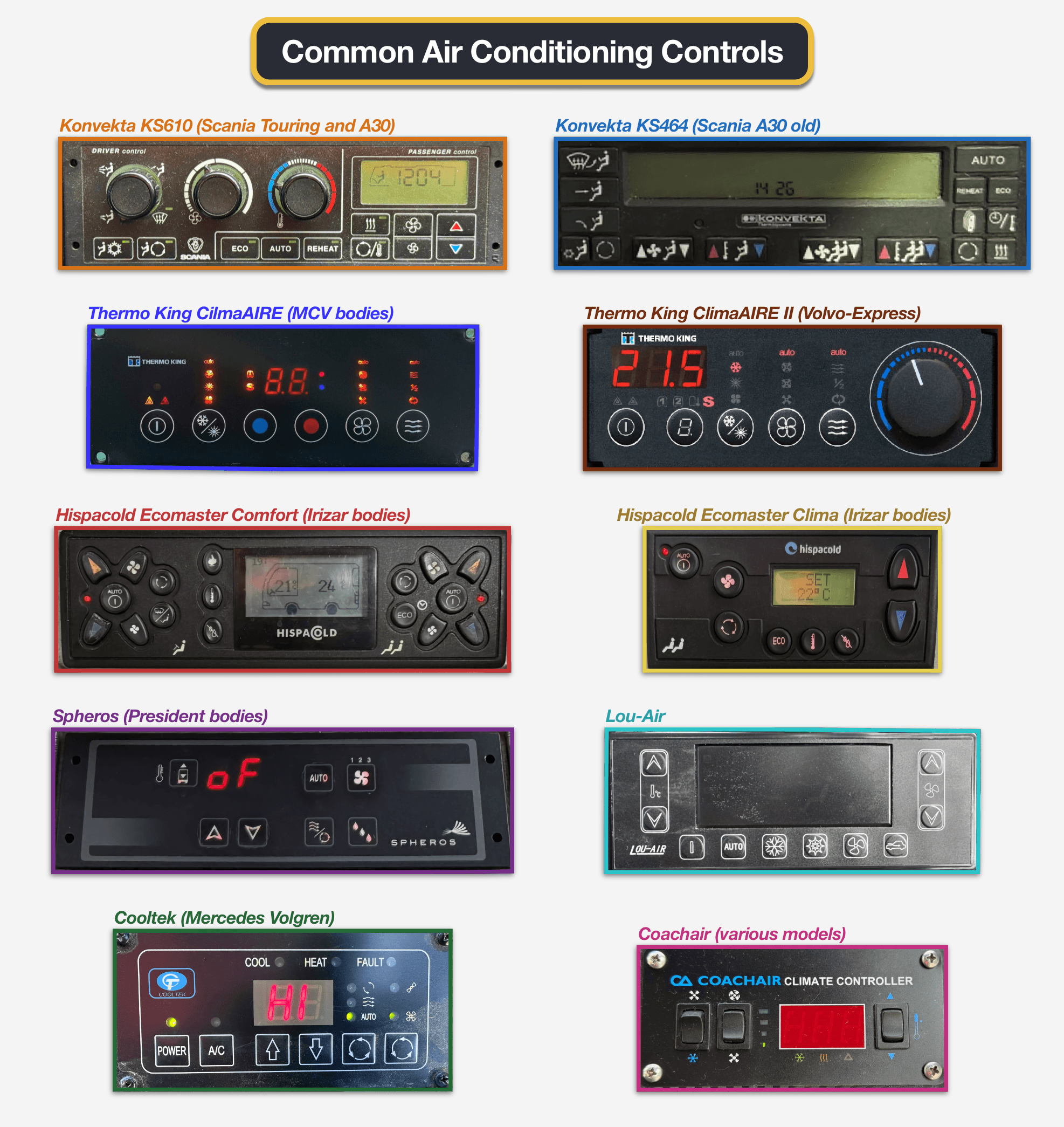
Basic Operation
Konvekta KS610 – Scania Touring and A30 (newer version)
This unit handles the driver and passenger areas separately. The left side of the panel controls the driver area (3 rotary knobs and 2 pushbuttons), and the right side controls the passenger area (cabin).
Driver Area Climate
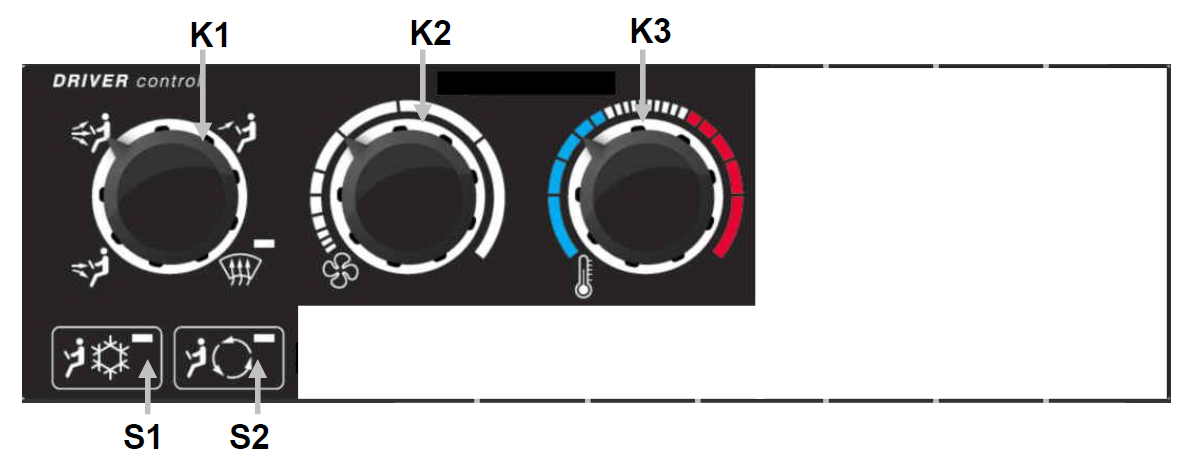
- Body and feet
- Body, feet and face
- Face only
- Windscreen defrosting (only activates when the alternator is ON)
The first knob adjusts the direction of the airflow. From left to right, you can set the following directions (with transition):
The second knob sets the air speed.
Set the temperature between 12-30°C. The display shows the set value.
Press this key to turn on the driver’s air conditioning. This button is active only when the cabin air conditioner is ON.
Press this button to switch between fresh air intake and recirculation at the driver’s seat.
Passenger Area Climate
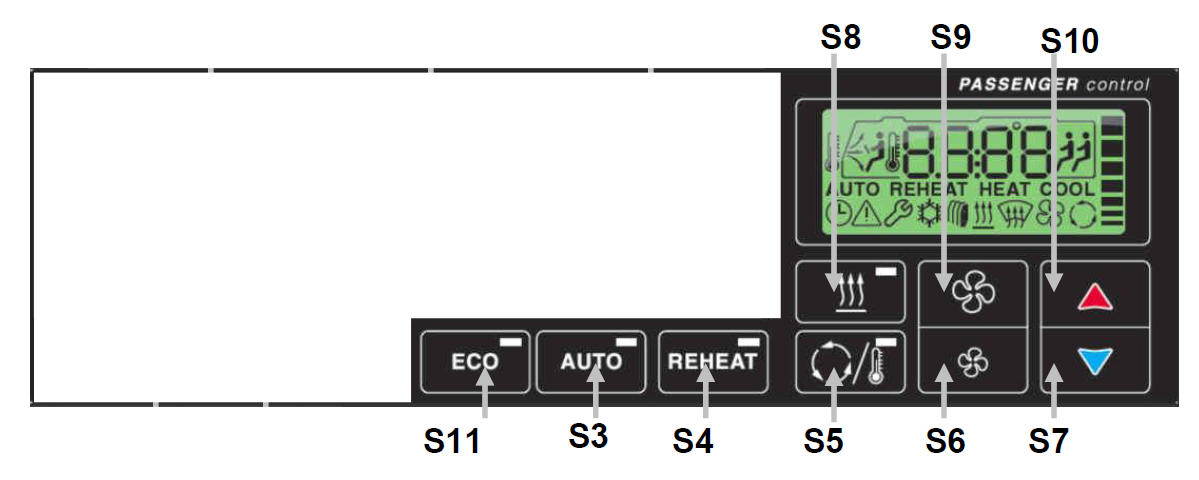
Press the AUTO button to let the system automatically manage temperature and fan speed. The LED lights up.
Press and hold this button to cycle through three fixed modes: AUTO ► HEAT ► COOL ► AUTO. (HEAT mode locks out the compressor, while COOL mode locks out heating.)
Press the Up/Down arrows in the bottom-right corner to set the desired cabin temperature. The red button ▲ increases the temperature. The blue button ▼ decreases it.
This button starts a timed (20-minute) strong heating function to heat the cabin quickly, then returns to normal operating mode.
This button starts a timed (10-minute) strong cooling function with air recirculation to cool the cabin quickly, then returns to normal operating mode.
Press the Propeller buttons below the middle of the display to set the desired air speed. (When you press either button, the AUTO mode turns off.)
The Large propeller button increases the fan speed. The Small propeller button decreases it.
Press this button to activate the energy-saving mode. This mode turns off the compressor; it can only be used for ventilation and heating, but not for active cooling.
Avoid this mode if you need window demisting or air dehumidifying.
Press this button to activate the auxiliary heater (booster heat for very cold days).
Konvekta KS464 – Scania A30 (older version)
This unit handles the driver and passenger areas separately. The left side of the panel controls the driver area, and the right side controls the passenger area (cabin).
Driver Area Climate
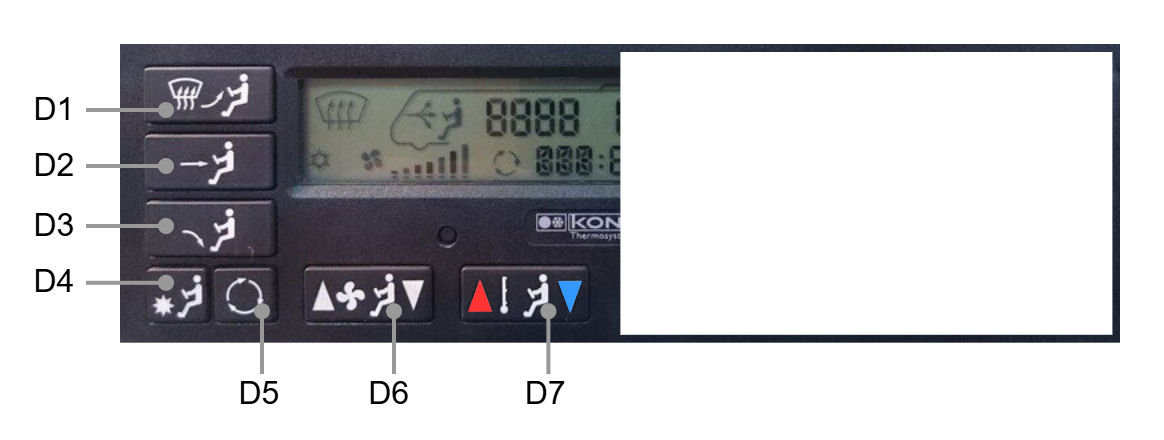
Press these buttons to open/close the air vents for the windscreen/face (D1), body (D2), and foot area (D3).
Press and hold the D1 button to activate windshield defrosting.
This double switch sets the air speed. Press the left side to decrease the fan speed, or the right side to increase it.
Set the temperature between 12-30°C. Press the left side (red) to increase the temperature, or the right side (blue) to decrease it. The display shows the set value.
Press this key to turn on the driver’s air conditioning.
Press this button to switch between fresh air intake and recirculation at the driver’s seat.
Passenger Area Climate
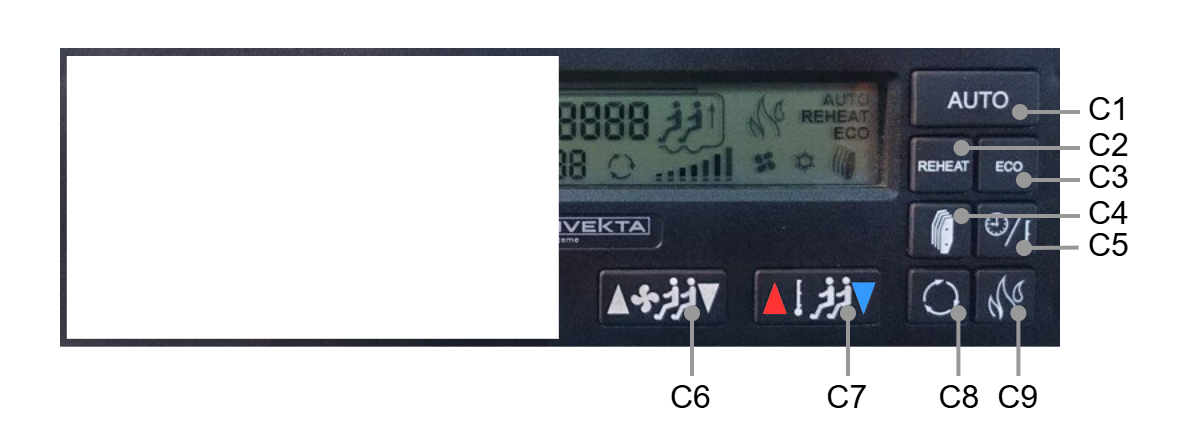
Press the AUTO button to let the system automatically manage temperature and fan speed. The temperature is set to a default value of 23°C, and the fan speed is automatically adjusted as needed.
The A/C compressor turns off if the outside temperature is below 17°C and restarts if it is above 19°C.
This double switch sets the cabin temperature. Press the red side ▲ to increase the temperature, or the right side ▼ to decrease it.
This button turns on recirculating and starts a timed (20-minute) strong heating and dehumidifying function to heat and dry the cabin quickly, then returns to AUTO operating mode.
While REHEAT is on, the A/C compressor turns off if the outside temperature is below 3°C and restarts if it is above 5°C.
This double switch sets the fan speed. Press the left side ▲ to increase the air speed, or the right side ▼ to decrease it.
Press this button to activate the energy-saving mode. This mode turns off the compressor; it can only be used for ventilation and heating, but not for active cooling.
Avoid this mode if you need window demisting or air dehumidifying.
Press this button to switch between fresh air intake and recirculation in the cabin.
Press the button in the bottom-right corner to activate the auxiliary heater (booster heat for very cold days).
Thermo King ClimAIRE – MCV bodies
Thermo King ClimAIRE II – Volvo Express
Hispacold Ecomaster Comfort – Irizar bodies
System Note: This panel is split into Driver Control (on the left) and Passenger Control (on the right).
Hispacold Ecomaster Clima – Irizar bodies
SET 22°C).Spheros – President bodies
Lou-Air
Cooltek – Mercedes Volgren
- COOL: Illuminates when system is actively cooling.
- HEAT: Illuminates when system is actively heating.
- FAULT: Lights up if there is a system malfunction.
Coachair – various models